> ## Documentation Index
> Fetch the complete documentation index at: https://serval-hannah-docs-custom-access.mintlify.site/llms.txt
> Use this file to discover all available pages before exploring further.
# GitHub
Serval's GitHub integration lets you automate common Dev & IT tasks—from provisioning new repos to opening fully-formed pull requests—without leaving your service desk.\
Everything runs through an official GitHub App, so actions are scoped, logged, and revocable at any time.
***
## What is GitHub?
[GitHub](https://github.com) is the industry-standard platform for hosting Git repositories, collaborating on code, and managing the software-development lifecycle. Teams organize under **organizations**, group work in **repositories**, and collaborate through **branches**, **pull requests (PRs)**, and **issues**.
***
## What Serval can do once connected
We have **two** GitHub Apps so you can choose the minimum level of access that fits your security posture:
### AI Engineer
| Capability | Description |
| -------------------- | -------------------------------------------------------------------------- |
| Automation workflows | Read and write code only. Create branches, commit changes, open/update PRs |
### Admin
| Capability | Description |
| -------------------- | ------------------------------------------------------------------------- |
| Access Management | Add/remove organization members, manage team memberships |
| Automation workflows | Create/delete repositories, configure webhooks + AI Engineer capabilities |
> **Note**\
> Serval never receives *repository secrets*, PATs, or environment variables.
Anything defined in the [GitHub API](https://docs.github.com/en/rest?apiVersion=2022-11-28) can be accessed through Serval.
***
## Configure GitHub
### Prerequisites
* You must be an **Organization Owner** in GitHub to complete installation.\
Non-owners can start the flow but the app remains *pending approval* until an owner approves it.
* Decide which Serval GitHub App you need: **AI Engineer** or **Admin**.
 ### Step-by-step
1. In **Serval → Applications**, find **GitHub** and click **Connect**.
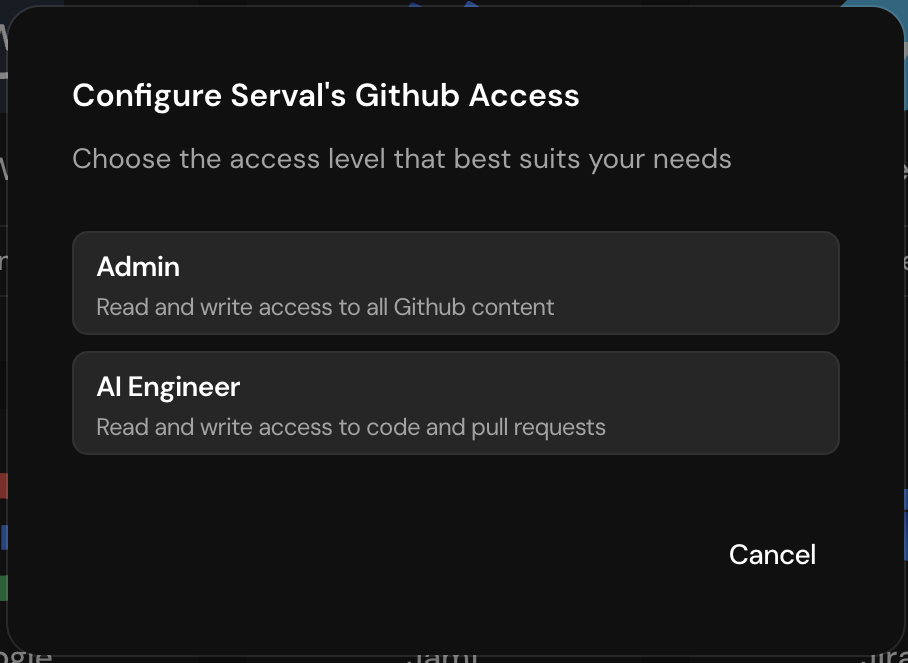
2. Choose the **AI Engineer** or **Admin** access level.
3. You are redirected to GitHub. Select the target **organization**.
4. Review permissions and (optionally) limit the app to specific repositories.
5. Click **Install & Authorize**.
6. ✅ If you are an Org Owner, you are returned to Serval and the integration shows **Healthy**.\
🚧 If you are **not** an Org Owner, GitHub marks the installation **pending**. Serval displays an **"Installation Pending"** badge until an owner clicks **Approve** in GitHub ➜ *Settings → Installed GitHub Apps*.
### Permission reference
| App | Read-only scopes | Read/Write scopes | Admin scopes |
| --------------- | ------------------------------------------------------------ | --------------------------------------------------------------------------------------------------------------------------- | ---------------------------------------------------- |
| **AI Engineer** | `metadata` | `code`, `pull_requests`, `commit_statuses` | — |
| **Admin** | `codespaces`, `metadata`, `models`, many org-level analytics | Everything in AI Engineer **plus**:
### Step-by-step
1. In **Serval → Applications**, find **GitHub** and click **Connect**.
2. Choose the **AI Engineer** or **Admin** access level.
3. You are redirected to GitHub. Select the target **organization**.
4. Review permissions and (optionally) limit the app to specific repositories.
5. Click **Install & Authorize**.
6. ✅ If you are an Org Owner, you are returned to Serval and the integration shows **Healthy**.\
🚧 If you are **not** an Org Owner, GitHub marks the installation **pending**. Serval displays an **"Installation Pending"** badge until an owner clicks **Approve** in GitHub ➜ *Settings → Installed GitHub Apps*.
### Permission reference
| App | Read-only scopes | Read/Write scopes | Admin scopes |
| --------------- | ------------------------------------------------------------ | --------------------------------------------------------------------------------------------------------------------------- | ---------------------------------------------------- |
| **AI Engineer** | `metadata` | `code`, `pull_requests`, `commit_statuses` | — |
| **Admin** | `codespaces`, `metadata`, `models`, many org-level analytics | Everything in AI Engineer **plus**:
`actions`, `administration`, `issues`, `packages`, `deployments`, `workflows`, ... | `org_projects`, `repo_projects`, `custom_properties` |
*(Exact scope lists are visible during GitHub's install screen.)*
***
## Serval Configuration
1. After GitHub redirects back, the tile turns **Healthy**.
2. Build workflows in **Workflow Builder → GitHub Actions**. Serval automatically injects the correct installation token.
3. When adding **user-management** steps, supply GitHub *usernames* (email addresses are not supported by the GitHub API).
4. Serval health-checks the installation token every hour and surfaces any issues on the Applications page.
### Managing access later
* **Change permission tier** – Remove the existing GitHub App in GitHub **Settings → Installed GitHub Apps**, then repeat the connection flow with the other tier.
* **Uninstall** – Remove the app in GitHub; Serval will mark the connection as *Disconnected* automatically.
***
Need help? Drop us a note at **[support@serval.com](mailto:support@serval.com)**.\
Happy automating! 🚀